Help · At the table
Buy from a post on Facebook or Trade Me
Between shows, most buying is from posts. Tap "Deal actions" at the top of Buy, then "Buying from a post". It needs signal: reading the screenshot, the prices and Offers out are all on the server.
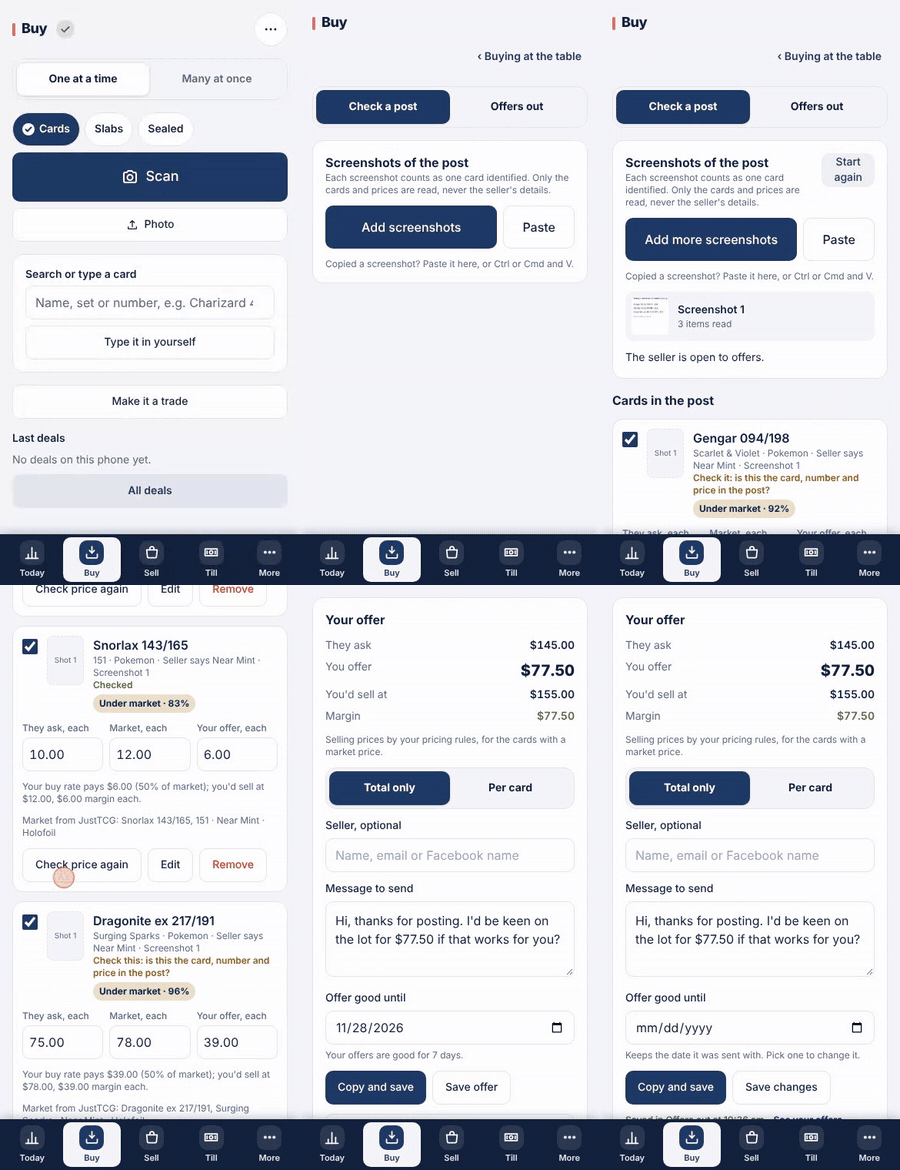
- Take a screenshot of the post. Tap "Choose screenshots" and pick it, or paste a copied one. One scan is spent per screenshot, however many cards it shows, and nothing is charged when no cards for sale are read.
- The cards read from the post are listed under "Cards in the post", each with what it asked. Tap the button to find their market prices at once.
- Check every card against the post: tap "Looks right", or "Edit" to fix the name, number or asking price. The offer waits until each one is checked.
- Under "Your offer" you see what they ask, what you offer from your buy rates, what you would sell at and the margin. Choose "Total only" or "Per card" for the message.
- Tap "Copy and save": the message is on your clipboard to paste into Messenger, and the offer is kept in "Offers out" until they answer.
Good to know
- The poster's name is never read from the post, and the screenshot is never kept on the server. Type the seller yourself if you want to remember who it went to.
- When they say yes, the cards go to the buying inbox, paid by bank, and are checked in when the parcel arrives. Never the till.
- An offer above what the seller asks is never made: a typed offer is capped at the asking price.